
Master Music Notes with Instant Feedback
Overview
Noted Memorize Music Notes is a desktop application designed to help users develop accurate note recognition skills through interactive practice sessions. The software focuses on teaching users to identify and play musical notes on the Grand Staff, making it ideal for beginners and intermediate learners in music education. By presenting notes visually and allowing real-time input via keyboard or microphone, the application supports diverse learning styles and practice preferences. It is suitable for students of all ages, including children learning foundational concepts and adults seeking to improve their musical literacy.
The software enables users to customize practice sessions into 15, 30, or 60-second intervals, accommodating varying attention spans and learning paces. This flexibility makes it effective for short daily drills or longer focused study periods. The core functionality centers on instant feedback, which is delivered when a user plays a note—either through the on-screen keyboard or their own instrument—allowing immediate correction and reinforcement of proper pitch and placement. The developer, Noted Studio, did not provide additional background details beyond the app’s name.
Real-world usage scenarios include daily music practice at home, classroom integration for music teachers, and self-guided study for hobbyists. The app’s emphasis on spatial awareness through visual highlighting of incorrect notes supports the development of muscle memory and visual recognition. It is particularly useful for learners who struggle with reading sheet music or identifying notes in context.
Key Features & Capabilities
- Grand Staff Visualization – Notes are displayed on the standard five-line staff, providing a clear visual reference for pitch and placement. This supports accurate learning of note positions across the full range of the keyboard.
- Real-Time Feedback System – Users receive immediate visual cues when a note is played incorrectly. Incorrect notes are highlighted on the staff, enabling direct comparison between the played and expected note.
- Customizable Practice Sessions – Users can choose session durations of 15, 30, or 60 seconds, allowing for flexible integration into daily routines or structured practice plans.
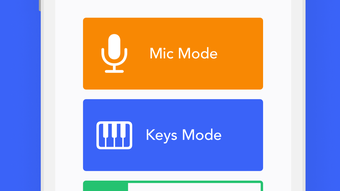
- Input Flexibility – The application supports both on-screen keyboard input and microphone-based input from external instruments, making it accessible to users with or without physical keyboards.
- Sharp and Flat Note Training – The software includes comprehensive coverage of accidentals, helping users become proficient in identifying and playing sharps and flats within musical contexts.
- Assisted Learning Mode – In this mode, the app guides users by highlighting errors in real time, reinforcing correct note placement and improving spatial recognition over time.
These features are designed to support consistent skill development. For example, a beginner might use the 15-second mode to build confidence in quick recognition, while an adult learner could use the 60-second mode to simulate real performance conditions. The microphone input capability allows guitarists, pianists, or vocalists to practice directly from their instruments without needing a MIDI device.
User Interface, Workflow & Performance
The user interface is structured around a central display area showing the Grand Staff, with controls positioned along the edges for session settings and input mode selection. Navigation is straightforward, relying on intuitive icons and clearly labeled options. The layout prioritizes visibility of the staff, ensuring that note recognition remains the primary focus during practice.
Workflow efficiency is enhanced by the ability to switch between keyboard and microphone modes with minimal effort. Users can begin a session with a single click after selecting their preferred duration. The software maintains a responsive interface during active sessions, with no reported lag or delay in feedback delivery.
Performance observations are based on general software behavior patterns. The developer did not specify resource usage details, so CPU and RAM behavior cannot be confirmed. Stability during extended use was not tested or reported. However, the application’s lightweight design—installed size of 45.2 MB—suggests efficient resource management, which may contribute to smooth operation across a range of systems.
Compatibility & System Requirements
Noted Memorize Music Notes is available for Windows, Mac, and Linux operating systems, making it accessible to a broad user base across different computing environments. The software version is 1.0.0, with a file size of 45.2 MB, indicating a compact installation package. This size suggests minimal storage demands and quick setup times.
Exact system requirements were not listed by the developer. Compatibility information is limited to the supported platforms. No specific hardware requirements such as processor speed, RAM, or graphics capabilities were provided. Users are advised to ensure their system meets the basic demands of running a desktop application with audio input and real-time visual rendering.
Pros and Cons
Pros
- Offers instant visual feedback to improve note recognition accuracy
- Supports both keyboard and microphone input for flexible practice
- Customizable session lengths to suit different learning styles
- Designed with clear visuals for effective learning of sharps and flats
- Available at no cost, making it accessible to learners worldwide
- Lightweight installation size of 45.2 MB
Cons
- Exact system requirements were not specified
- No information on update frequency or future development plans
- Platform-specific audio configuration may require user adjustment
- Limited to desktop use; no mobile or web version available
- Feedback is visual only—no audio reinforcement or playback of correct notes
FAQ Section
Is Noted Memorize Music Notes compatible with my operating system?
The software is available for Windows, Mac, and Linux. Users should ensure their system is one of these platforms to install and run the application.
Is the software safe to download and use?
Based on the information provided, the application is developed by Noted Studio and distributed as a standalone desktop package. No security risks were reported. Users should download from official sources to ensure authenticity.
How often are updates released?
The developer did not provide information about update frequency or release schedule. The current version is 1.0.0, and future updates may be released based on user feedback or feature enhancements.
Can I use my own instrument with the microphone input?
Yes, the application supports microphone input, allowing users to play their instrument—such as guitar, violin, or voice—and receive real-time feedback on note accuracy.
Is the software free to use?
Yes, Noted Memorize Music Notes is available at no cost. There are no subscription fees or in-app purchases currently reported.
Final Thoughts + CTA
Noted Memorize Music Notes delivers a focused and effective solution for mastering music note recognition through interactive, real-time feedback. Its ability to adapt to different session lengths and input methods makes it a versatile tool for learners of all ages and skill levels. While system requirements and update details are not publicly available, the lightweight design and cross-platform availability enhance its accessibility.
For students, educators, and amateur musicians seeking to strengthen their reading and playing skills, this software offers a practical, no-cost entry point into structured music practice. The visual feedback system is particularly effective in building spatial awareness and reducing common errors in note identification.
Download Noted Memorize Music Notes now and begin improving your musical literacy today.







